
Nissan Leaf Owners Manual | 2025
9.17.8.3. Steering Assist display and indicators
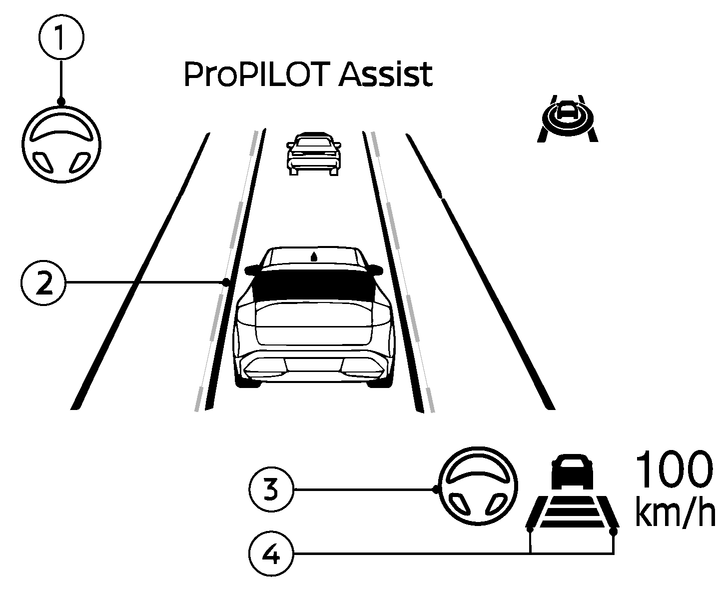
Steering Assist indicator
Indicates the status of the Steering Assist by the colour of the indicator:
Steering Assist indicator (white): Steering Assist standby
Steering Assist indicator (green): Steering Assist active
Lane marker indicator
Indicates whether the system detects the lane marker:
Lane marker indicator (no lane): Lane markers not detected
Inside marker indicator (green): Lane markers detected
Outer lane marker (white): defines the type of lane marker (solid, dashed, etc.)
Lane marker indicator (yellow): Lane departure is detected
Steering Assist status indicator/warning
Displays the status of the Steering Assist by the colour of the indicator/warning:
No Steering Assist status indicator displayed: Steering Assist is turned off
Steering Assist status indicator (white): Steering Assist standby
Steering Assist status indicator (green): Steering Assist active
Steering Assist status indicator (yellow): Steering Assist malfunction
Steering Assist status indicator (red): Hands off detected
Lane marker indicator/speed control status indicator/set distance indicator
Displays the status of the Steering Assist by the colour of the lane marker indicator.
Lane marker indicator (no lane): Steering Assist is turned off
Lane marker indicator (white): Steering Assist standby
Lane marker indicator (green): Steering Assist active
For the speed control status indicator and set distance indicator, see
.When the Steering Assist is in operation, the Steering Assist status indicator (3), the Steering Assist indicator (1), and the lane marker indicator (2) and (4) on the vehicle information display turn green.
When the Steering Assist deactivates, the Steering Assist status indicator (3), the Steering Assist indicator (1) turn white and both the lane marker indicator (2) and (4) disappear on the vehicle information display and a chime sounds twice.