
Nissan Leaf Owners Manual | 2025
4.3.1.3. How to stop DC fast charge
Follow the instruction on the DC fast charge equipment to stop charging or push the charge connector unlock switch (A) in the charge port after unlocking the driver’s door or approaching the vehicle with the Intelligent Key.
Confirm charging is stopped by looking at the charging status indicator light on the instrument panel. The charge connector can be disconnected from the vehicle when charging is stopped.
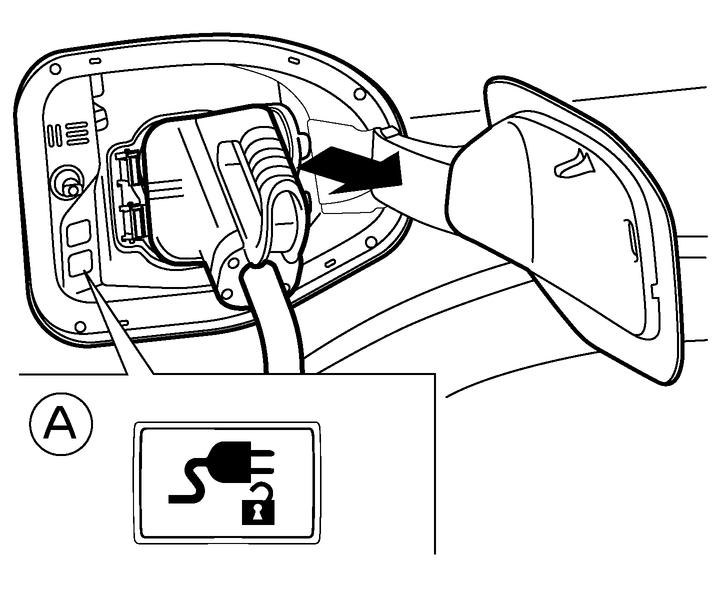
Remove the charge connector from the vehicle and store it away properly.

If the charge connector appears to be stuck, (see
).The charge connector will be locked after it is connected. To unlock the charge connector without starting to charge, push the charge connector unlock switch in the charge port after unlocking the driver’s door or approaching the vehicle with the Intelligent Key.
When connecting or removing the charge connector, the charge port light will illuminate for approximately 30 seconds. (See
.)When you walk away from the vehicle with the Intelligent Key, the charge port light will go off.
Close the charge port cap.
Close the charge port lid.
As the DC fast charge connector is heavier in comparison to the other charge connectors, allowing it to drop could cause damage to the vehicle or charge connector or personal injury. When removing the connector, be sure to pull it out straight and as carefully as possible.