
Nissan Leaf Owners Manual | 2025
6.5.1. How to use the vehicle information display
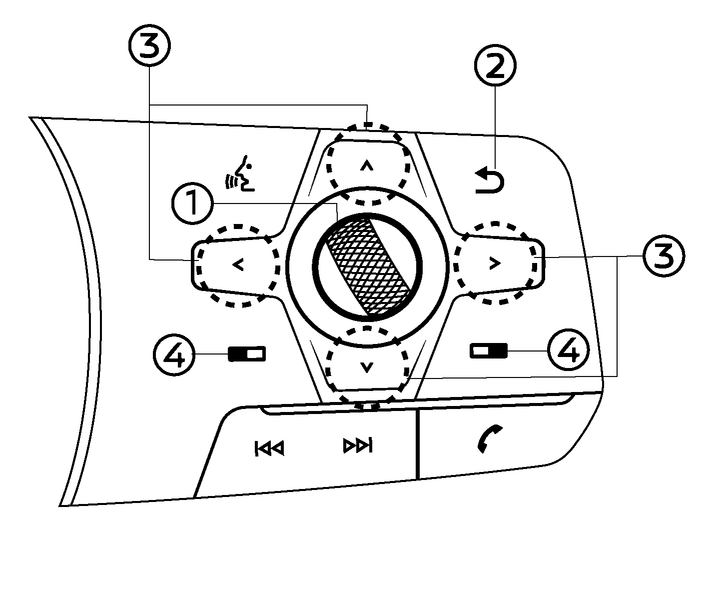
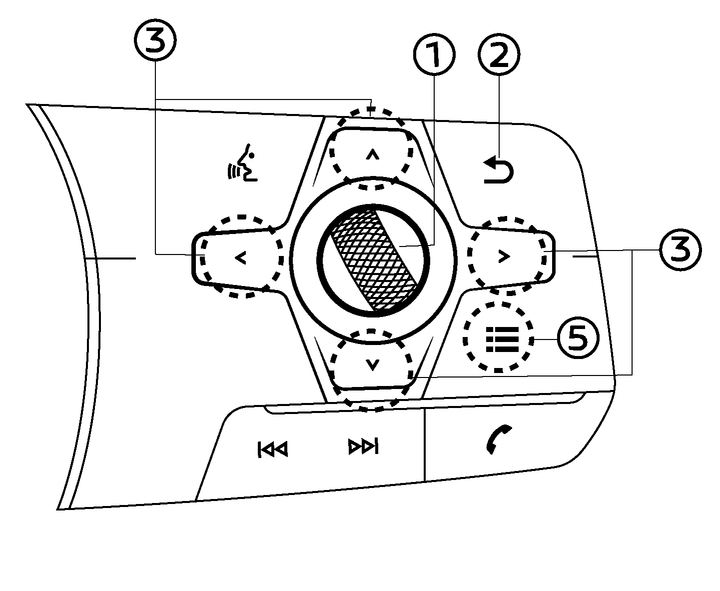
The vehicle information display can be changed using the dial and buttons located on the steering wheel.
Scroll dial - navigate through the items and change or select an item in vehicle information display this scroll dial allows up/down navigation and push to select
 - go back to the previous menu


 - change from one display screen to the next (i.e. trip, energy economy)
Type A (where fitted):
For LHD models, push
. to operate the touch screen display by the steering-wheel-mounted controls. For additional information, see
 For LHD models, push
 to operate the vehicle information display by the steering-wheel-mounted controls. If the vehicle information display is already active ( illuminates in yellow), pushing this switch will cause [Shortcut Menu] screen to appear.
For RHD models, push
to operate the vehicle information display. In case that the vehicle information display was already active ( illuminates in yellow), pushing this switch will cause [Shortcut Menu] screen to appear.For RHD models, push
to operate the touch screen display.Type B (where fitted):
Pushing
 displays the [Shortcut Menu] screen.