
Nissan Leaf Owners Manual | 2025
8.5.1.2. 3D view
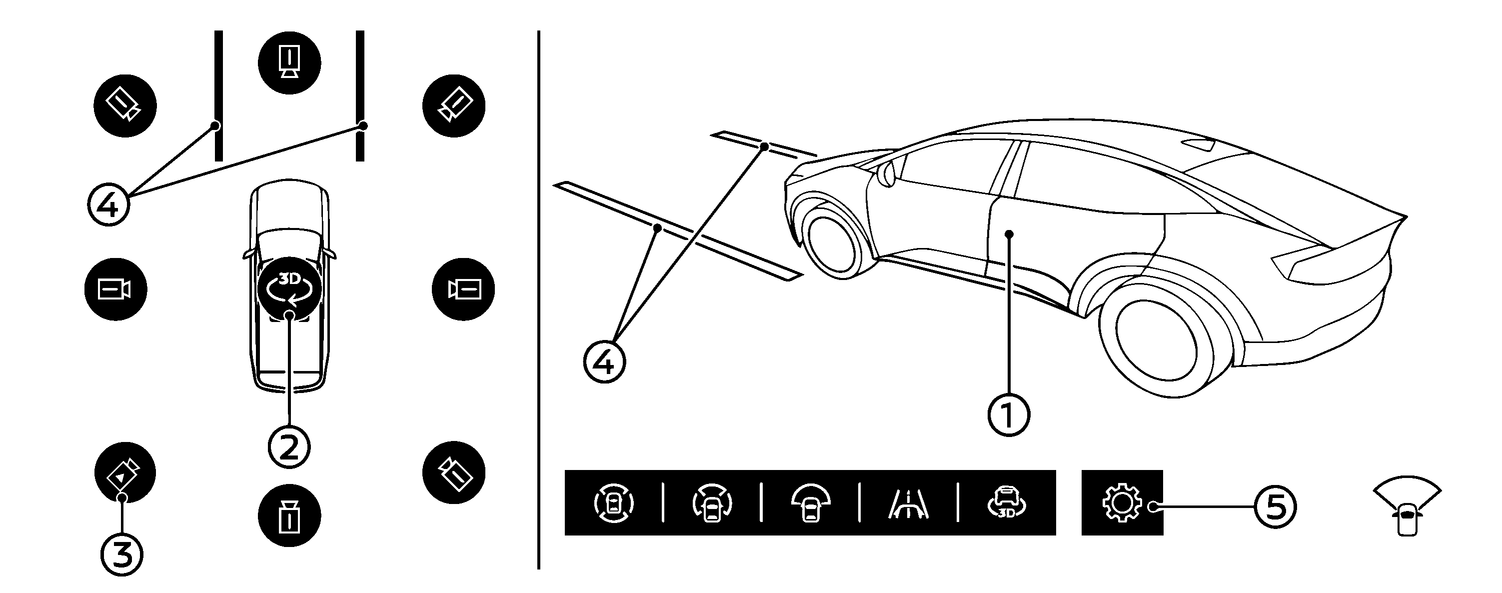
The 3D view shows the 360-degree view around the vehicle which helps confirm the vehicle position and the predictive course to a parking space. The 3D view is not available when R (Reverse) is selected.
The vehicle image (1) rotates when touching the rotation icon (2). When touching the rotation icon, the vehicle image and the surrounding area image will pop up and turn 360° to check the vehicle surroundings.
The vehicle image can can also be rotated by swiping the vehicle image itself.
8 different camera directions can be selected by touching the camera position icon (3).
The predictive course lines (4) indicate the predicted course when operating the vehicle.
The distance between objects viewed in the view differs from the actual distance.
There are some areas where the system will not show objects. See
for more details.
Automatic 360° Moving
When you push the <CAMERA/ > button at the first time after the power switch has been placed in the ON position, the vehicle image and the surrounding area image will pop up and turn 360° automatically [Automatic 360° Moving] to check the vehicle surroundings.
How to switch ON/OFF the Automatic 360° Moving feature
When the camera screen is displayed, touch  (5) to open the [Settings] menu, then select [Automatic 360° Moving] and enable or disable this feature.