
Nissan Leaf Owners Manual | 2025
6.12.1.2. Intelligent Auto Headlight system
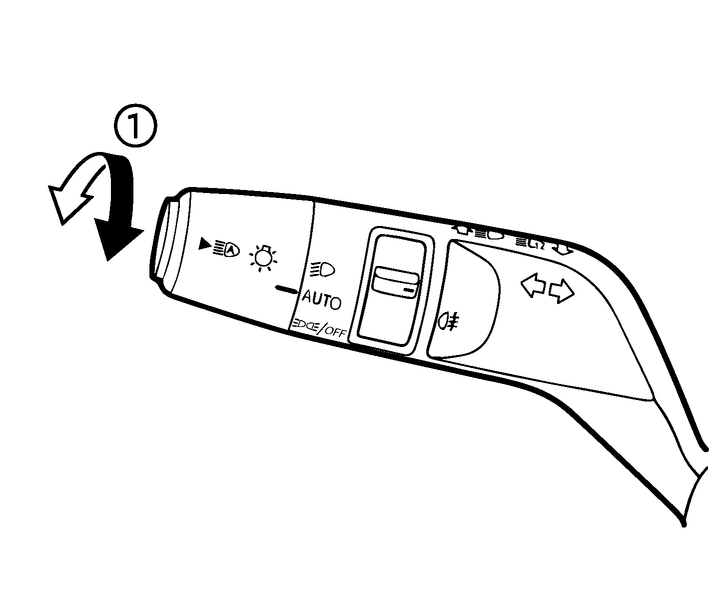
The Intelligent Auto Headlight system allows the headlights to be set so they turn on and off automatically.
To set the Intelligent Auto Headlight system:
Make sure the headlight switch is in the AUTO position (1).
Place the power switch in the ON position.
The Intelligent Auto Headlight system automatically turns the headlights on and off.
To turn the Intelligent Auto Headlight system off, turn the switch to the  position.
The Intelligent Auto Headlight system can turn on the headlights automatically when it is dark and turn off the headlights when it is light.
After switching to the  position (2), and then placing the power switch in the OFF position, the headlights may turn back on when the power switch is placed back to ON position.
The headlights will also be turned on automatically at twilight or in rainy weather.
With the AUTO position selected (headlights are on), if the power switch is placed in the OFF position and one of the doors is opened and this condition is continued, the headlights remain on for 5 minutes.
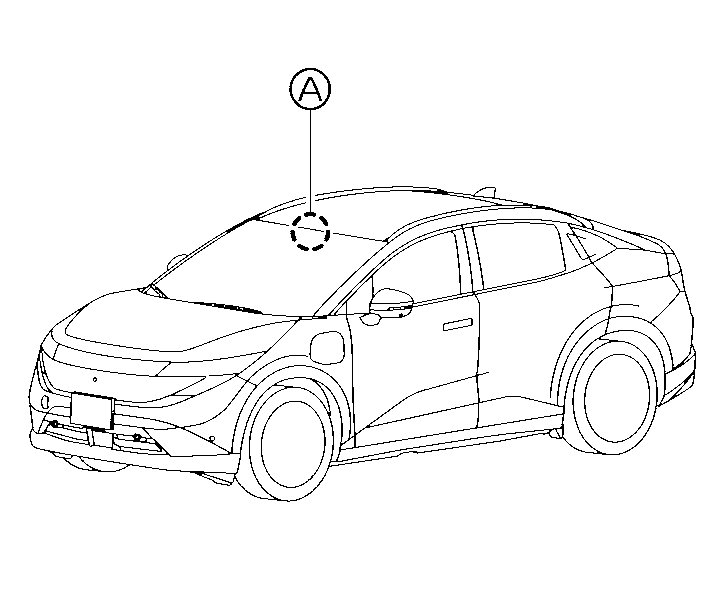
Be sure not to put anything on top of the sensor (A) located in front of the inside mirror. The sensor controls the Intelligent Auto Headlight; if it is covered, the sensor reacts as if it is dark and the headlights will illuminate.
Automatic headlights off delay
You can keep the headlights on for up to 180 seconds after you push the power switch to OFF and open any door then close all the doors. It can be activated by pulling the light stalk torwards rear position. Each pull adds extra 30 seconds of the delay. You can adjust the period of the automatic headlights off delay from 0 seconds (OFF) to 180 seconds.