
Nissan Leaf Owners Manual | 2025
6.3.1. Changing the meter screen view
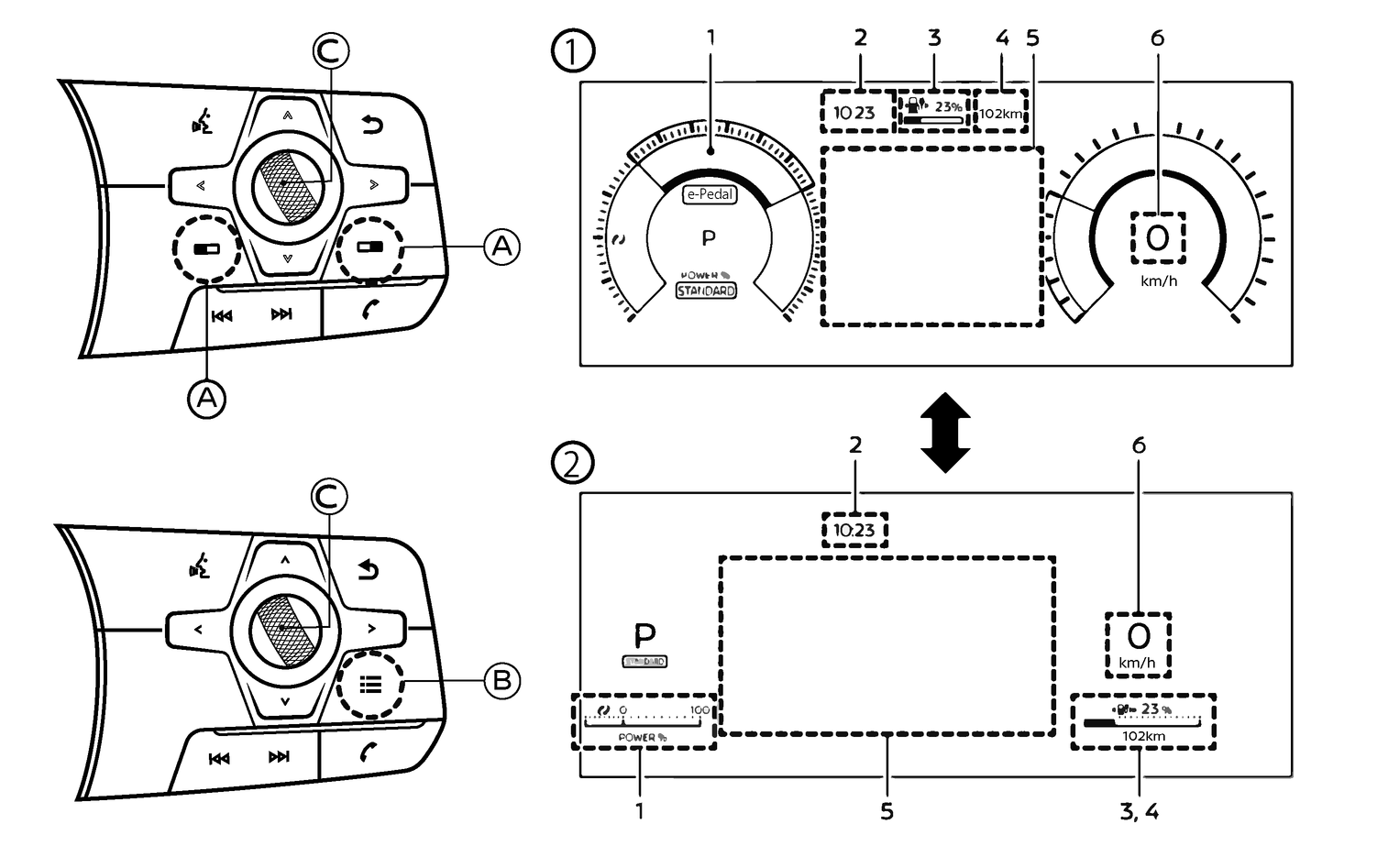
The meter screen view can be changed from Classic View (1) to Enhanced view (2) to expand the vehicle information display area.
- 1.Power meter
- 2.Clock
- 3.Li-ion battery available charge gauge
- 4.Estimated driving range
- 5,Vehicle information display
- 6.Vehicle speed
The meter screen view can be changed to expand the vehicle information display area.
To change the meter screen view:
Type A (where fitted): Push the control switch (A),
 (for LHD models) or
  (for RHD models), on the right side of the steering wheel while the colour of the button is in orange. [Shortcut Menu] menu appears on the vehicle information display area.
Type B (where fitted): Push the control switch (B) on the right side of the steering wheel.
[Shortcut Menu] appears on the vehicle information display area.
Select [Change Display View] by rotating the scroll dial (C) and push it to change the view.
Owners Manual