
Nissan Leaf Owners Manual | 2025
9.17.3. ProPILOT Assist system display and indicators
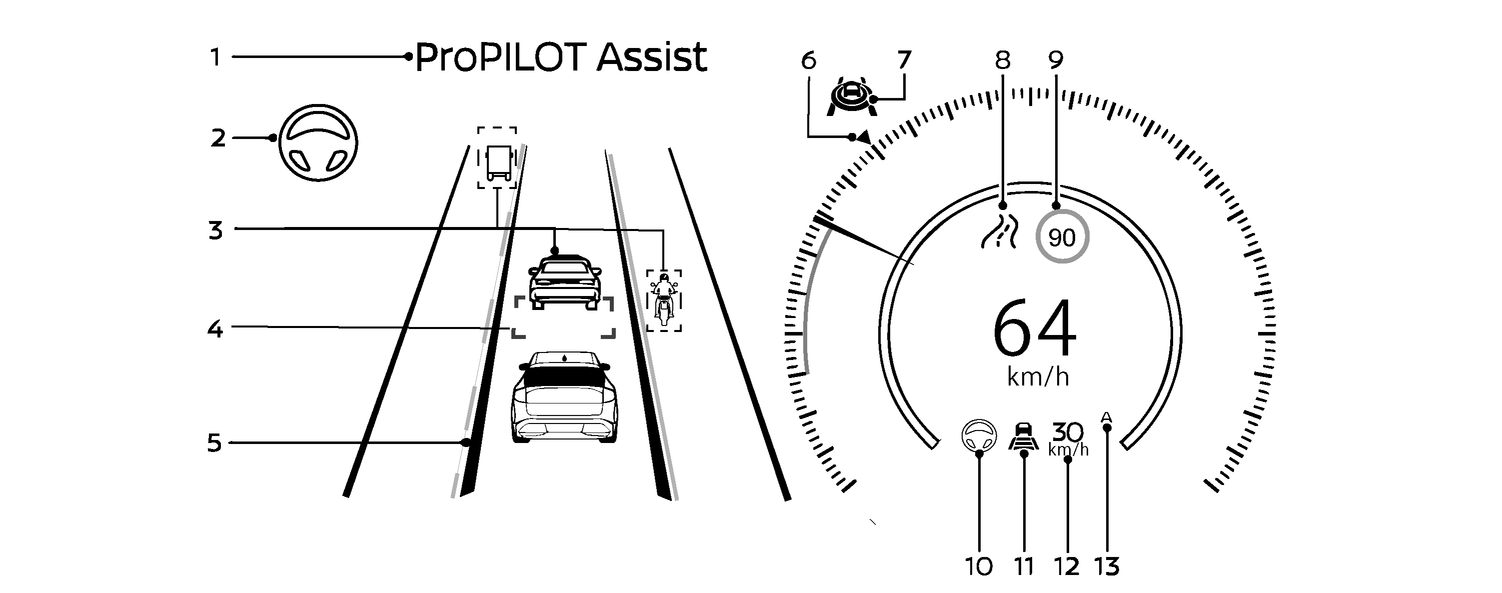
ProPILOT Assist activation
Displays once the ProPILOT Assist system is activated
Steering Assist indicator
Indicates the status of the Steering Assist function by the colour of the indicator
Steering Assist indicator (white): Steering Assist standby
Steering Assist indicator (green): Steering Assist active
Surrounding vehicle display and vehicle ahead detection indicator
Displays whether the system detects a vehicle in front of you (only when ICC is active).
System also detects surrounding vehicles in adjacent lanes.
Distance control vehicle marker
The distance control target vehicle is indicated with the green marker displayed below the vehicle.
Lane marker indicator
Indicates whether the system detects lane markers.
There are two types of lane markers.
Inside lane marker(green): Lane markers detected, Steering Assist is active
Outside lane marker (white): Displays the type of lane marker detected (solid, dashed, etc.)
Target speed indicator
Indicates the target vehicle speed.
ProPILOT Assist status indicator (
 )
)Indicates the status of the ProPILOT Assist system by the colour of the indicator
ProPILOT Assist status indicator (white): ProPILOT Assist is on but in standby
ProPILOT Assist status indicator (blue): ProPILOT Assist active
Road information indicator (where fitted) (
 ,
, ,
, ,
, ,
, )
)Indicates the detected road information or appears when the system adjusts the speed depending on a type of curve.
Detected road sign (speed limit) indicator (where fitted) (
 )
)Indicates the currently detected speed limit
Steering Assist status indicator/warning (
 ,
, )
)Displays the status of the Steering Assist by the colour of the indicator/warning
No Steering Assist status indicator displayed: Steering Assist is turned off
Steering Assist status indicator (grey): Steering Assist standby
Steering Assist status indicator (green): Steering Assist active
Steering Assist status indicator (yellow): Steering Assist malfunction
Steering Assist status indicator (red): Hands off detected
Speed control status indicator/set distance indicator/lane marker indicator (
 )
)Displays the status of speed control by the colour of the indicator, and displays the selected distance by the number of horizontal bars shown
Speed control status indicator (white): ICC standby
Speed control status indicator (green): ICC (distance control mode) is active
Green vehicle icon displayed: Vehicle detected ahead
No vehicle icon shown: No vehicle detected ahead (Your vehicle maintains the driver-selected set speed.)
Speed control status indicator (yellow): Indicates an ICC malfunction
Lane maker indicator
Displays the status of the Steering Assist by the colour of the lane marker indicator:
Lane marker indicator (no lane): Steering Assist is turned off.
Lane marker indicator (grey): Steering Assist standby.
Lane marker indicator (green): Steering Assist active.
Vehicle set speed indicator
Indicates the vehicle set speed
Green: ICC active
Grey: ICC standby
(The speed unit can be converted between “km/h” and “MPH”. See
.)Speed Limit Link indicator (${1}) (where fitted)
Indicates the Speed Limit Link activation mode or system operation
Display background colour will be grey once the ICC system is active or on standby. If the ICC system is off, the display bacground will be blank.
The ProPILOT Assist display is also shown in the Head Up Display (HUD) (where fitted). (See
).