
Nissan Leaf Owners Manual | 2025
9.18.3. IDC system operation
The IDC system brakes according to the distance from and the relative speed of the vehicle ahead to assist the driver in maintaining a following distance. The system will decelerate when necessary and if the vehicle ahead comes to a stop, the vehicle decelerates to a standstill. However, the IDC system can only apply up to approximatelly 40% of the vehicle's total braking power.
This system should only be used when traffic conditions allow vehicle speeds to change gradually. If a vehicle moves into the travelling lane ahead or if a vehicle travelling ahead rapidly decelerates, the distance between vehicles may become closer because the IDC system cannot decelerate the vehicle quickly enough. If this occurs, the IDC system will sound a warning chime and blink the system display to notify the driver to take necessary action. See
.The IDC system operates as follows:
When there is a vehicle travelling ahead, the IDC system adjusts the speed to maintain the distance from the vehicle ahead. If the vehicle ahead comes to a stop, the vehicle decelerates to a standstill. Once your vehicle stops, the IDC system keeps the vehicle stopped.
The IDC system may not control vehicle speed or warn you when you approach either stationary or slow-moving vehicles. You must pay attention to vehicle operation to maintain proper distance from vehicles ahead.
Normally when controlling the distance to a vehicle ahead, the system automatically decelerates your vehicle according to the speed of the vehicle ahead.
Depress the accelerator pedal to properly accelerate your vehicle when acceleration is required. Depress the brake pedal when deceleration is required to maintain a safe distance to the vehicle ahead due to sudden braking or if a vehicle cuts in. Always stay alert when using the IDC system.
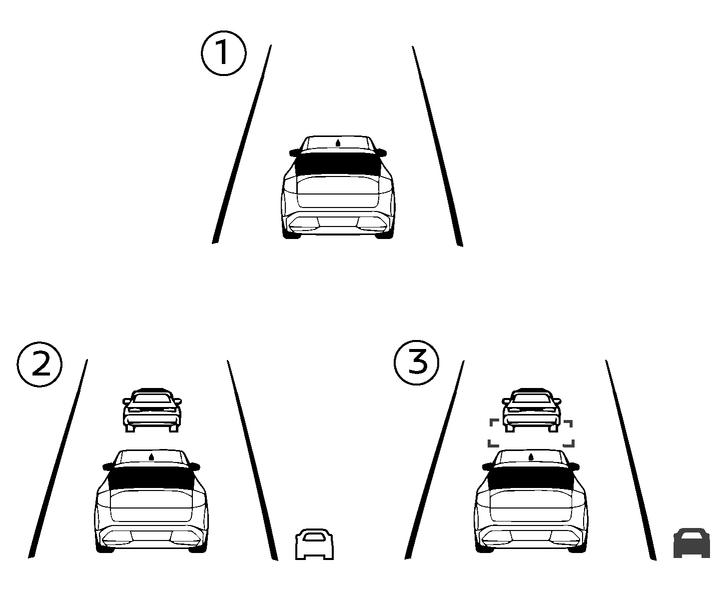
- (1)No vehicle detected ahead
- (2)Vehicle detected ahead (IDC status indicator turns white)
- (3)Vehicle detected ahead and system assisting with deceleration (IDC status indicator turns green and Distance control vehicle marker is displayed)
The IDC system assists the driver in maintaining a following distance to the vehicle ahead by applying the brake in the normal driving condition.
When a vehicle ahead is detected:
The vehicle ahead detection indicator appears. This indicator will also appear when the vehicle is driven on highways at speeds above 80 km/h (50 MPH) when the vehicle is at rist of undertaking another vehicle.
When approaching a vehicle ahead:
If the driver's foot is not on the accelerator pedal, the system activates the brakes to decelerate smoothly as necessary. If the vehicle ahead comes to a stop, the vehicle decelerates to a standstill within the limitations of the system.

The brake lights of the vehicle come on when braking is performed by the IDC system.
When the brake is applied by the system, a noise may be heard. This is not a malfunction.
Curve detected:
When the IDC system detects a curve, the system adjusts vehicle speed and the road information indicator comes on.
When the vehicle is through the curve, the road information indicator turns off.
Overriding the system:
The following driver operations overrides the system operation.
When the driver depresses the accelerator pedal, neither the brake control nor the alert by the system operates.
When the driver depresses the brake pedal, neither the brake control nor the alert by the system operates.
When the Intelligent Cruise Control (ICC) is set, the IDC system becomes inactive.