
Nissan Leaf Owners Manual | 2025
4.3.1.2. How to start DC fast charge
Park the vehicle in a position that allows sufficient margin for the charge cable length.
Push the park button to place the vehicle in the P (Park) position, and apply the parking brake.
Place the power switch in the OFF position.
Open the charge port lid. For additional information, see (
).
Follow the instructions on the DC fast charge equipment, insert the charge connector straight all the way in, and hold it in place with your hand.
Connect the charge connector to the charge port. If it is properly connected, a beep will sound once.

When the charge connector is properly and fully inserted, the beep sounds only once.
If the charge connector is not properly inserted (half-latched), the beep sounds continuously for 30 seconds and the charging status indicator light will flash in red. If this happens, hold the charge connector by your hands and move it so that it is directly facing the charge port in a straight line.
Once the connector is properly connected the beeps and red flashing will stop.
If the charge connector cannot be removed from the charge port, see (
).Be sure to insert the charge connector straight into the fast charge port all the way in. Failure to do so may result in the Li-ion battery not charging or could cause damage to the charging equipment.
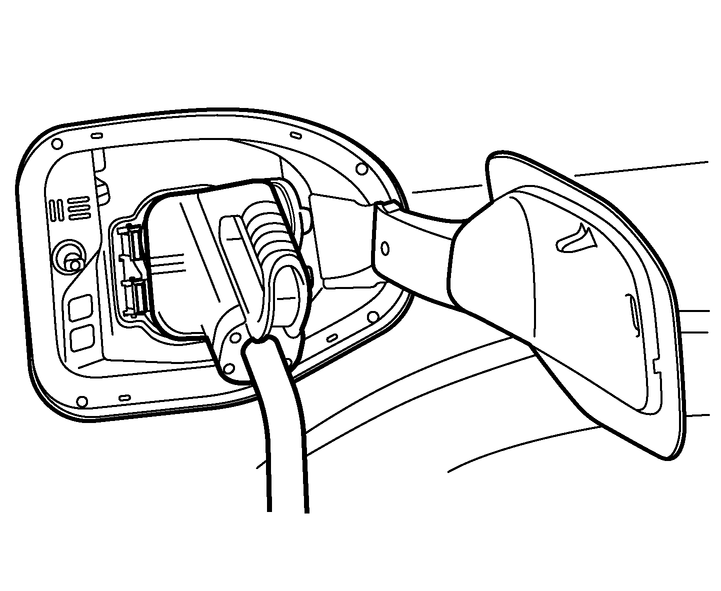
Follow the instructions on the DC fast charge equipment to start charging. When the equipment is properly installed and ready to charge, a beep sounds twice and the charging status indicator light will operate. See (
).
Charging ends in the following situations:
When charging is complete which is 100% state of charge unless a lower charge limit has been set.
When the possible charge time set for the DC fast charger is exceeded.
Park the vehicle in a position that allows sufficient margin for the charge cable length, as the charge connector may not be connected properly when the charge cable is pulled in one direction.
If the charge connector appears to be stuck, see (
).Charging may automatically stop even if it is not completed.
If charging stops mid-charge, you can restart charging after removing and reconnecting the charge connector, then pushing the start button on the DC fast charger station again.
The charge connector is locked to the charge port after it is connected and cannot be disconnected. Follow the instructions on the DC fast charge equipment to stop charging. Confirm charging is stopped by looking at the charging status indicator light on the instrument panel. The charge connector can be disconnected from the vehicle when charging has stopped.
When fast charging, the Li-ion battery charging rate is slower as the percentage of available battery charge increases.
When fast charging, the Li-ion battery charging rate is slower when the Li-ion battery temperature is extremely high or low.