
Nissan Leaf Owners Manual | 2025
9.17.8.5. Hands on detection
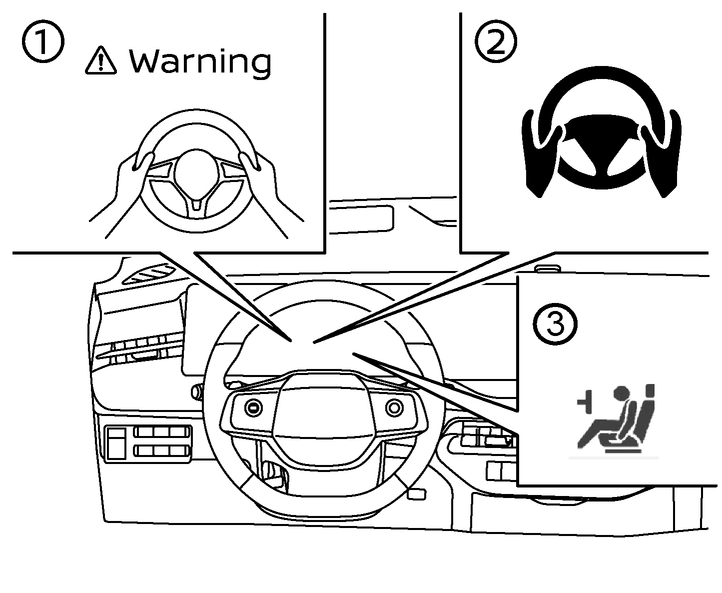
When the Steering Assist is activated, it monitors the driver’s steering wheel operation.
If the steering wheel is not operated or the driver takes his/her hands off the steering wheel for a period of time, the warning (1) appears in the vehicle information display and the hands OFF warning light (2) illuminates.
Steering Assist is not a system for a hands-free driving. Always keep your hands on the steering wheel and drive your vehicle safely. Failure to do so could cause a collision resulting in serious personal injury or death.

The sensors may not detect the driver's hand(s) on the steering wheel in the following situations and a sequence of warnings may occur:
Driving with gloves.
Protective covers on the steering wheel.
Gripping the part of the steering wheel without sensors, including leather joints and spokes.
Warnings and Emergency Stop
In Hands On (green) mode, the vehicle uses capacitative and torque sensors in the steering wheel to detect whether the driver has their hands placed on the steering wheel. It is the driver's responsibility to have hands on the wheel in order to avoid these increasing alerts.
First Warning:
Message appears in the vehicle information display alerting the driver that hands are not detected.
Driver must place their hands back on the steering wheel or applly light torque to the steering wheel to clear the message.
Second Warning:
Message begins to flash with escalating beeping sounds to draw driver's attention.
Driver must place their hands back on the steering wheel or applly light torque to the steering wheel to clear the message.
Third Warning:
The vehicle will apply 2 brake pulses to alert the driver of the failure to comply.
Driver must place their hands back on the steering wheel or applly light torque to the steering wheel to clear the message.
After the third warning has been accumulated several times, the Steering Assist function will be disabled with the [Steering Assist Unavailable for the rest of the drive] message displayed in the vehicle information display until the ignition switch has been switched off and on again.
Driver must place their hands back on the steering wheel or applly light torque.
Emergency Stop:
If the driver still does not operate the steering wheel, the Emergency Stop System begins and red optical warning (3) and sound warning appears.
Emergency warning sound will play and the [Manually Steer] or [Take Steering Control] and/or [Slowing to Stop] warning message will appear in the vehicle information display.
The vehicle will gradually slow to a complete stop in the travelling lane and the hazard indicator light will activate automatically.
After the emergency stop function is activated, the Steering Assist function will be disabled with the [Steering Assist Unavailable for the rest of the drive] message displayed in the vehicle information display until the ignition switch has been switched off and on again.
Driver must place their hands back on the steering wheel or applly light torque to deactivated the emergency stop.
The driver can cancel the deceleration at any time by steering, braking, accelerating or operating the ProPILOT assist switch:
The driver can cancel the system by operating ProPILOT Assist switches (Main, <CANCEL>, Speed Limiter, Steering Assist) or hazard lamp switch.
The driver can cancel the system by pressing the accelerator pedal twice.
The driver can cancel the system by the brake pedal twice.
The driver can cancel the system by operating the steering wheel from side to side.
When emergency system failure is detected, yellow indicator (3) appears and the system cannot operate properly.