
Nissan Leaf Owners Manual | 2025
9.11.2. How to enable/disable the TSR system
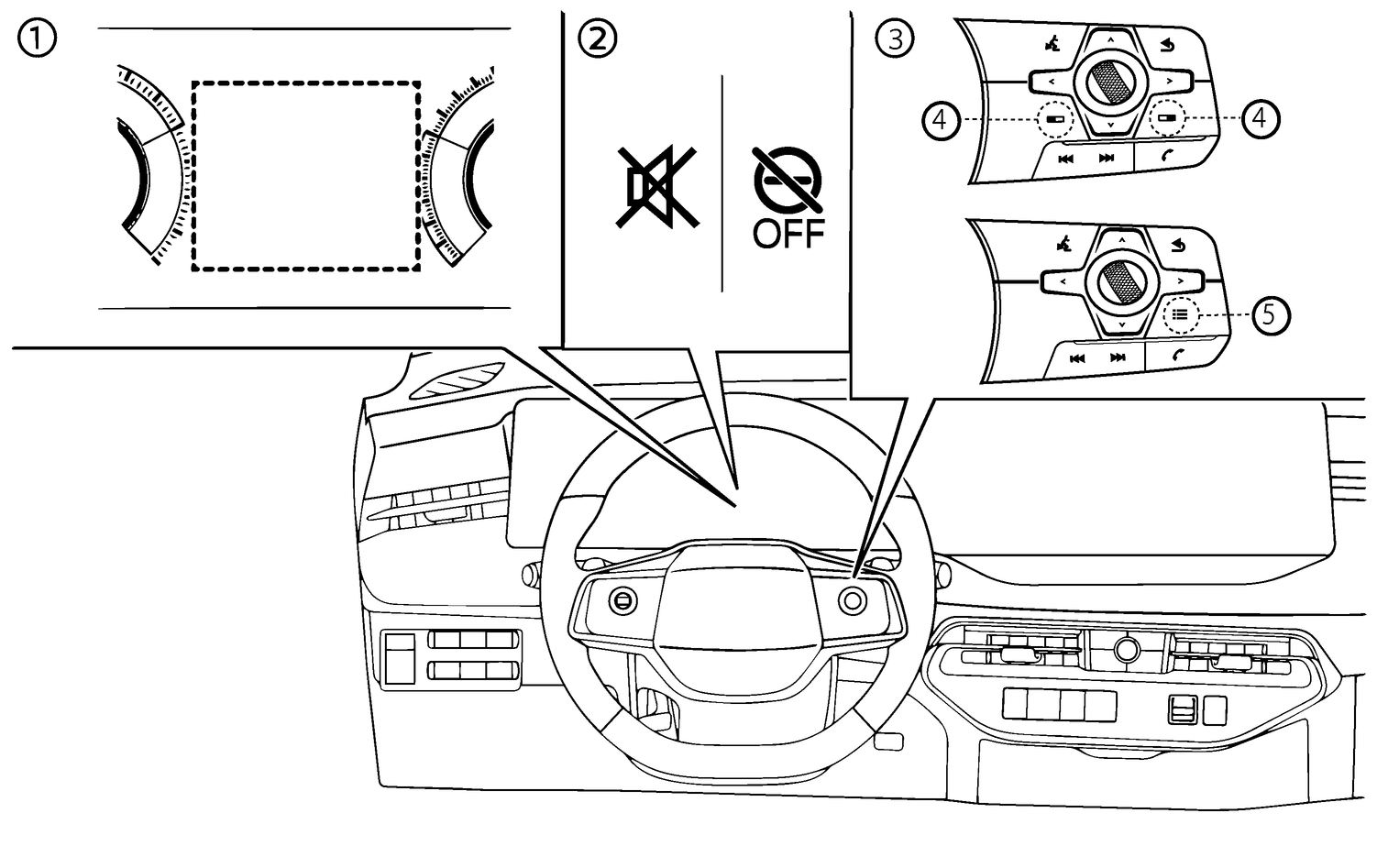
- (1)Vehicle information display
- (2)TSR indicators (on the vehicle information display)
- (3)Steering-wheel-mounted controls (right side)
- (4)Switch screen button/Shortcut menu button (where fitted)
- (5)Shortcut menu button (where fitted)
Perform the following steps to enable or disable the TSR system, or customise the settings.
Shortcut Menu
Push the switch screen (4) (where fitted)
 (for LHD models) or
  (for RHD models) button to display [Shortcut Menu]. Make sure that focus is previously being placed on the vehicle information display.
Push the shortcut menu button (5) (where fitted)
 to display [Shortcut Menu].
Select [Driver Assist Custom] and push the scroll dial to enable the system settings.
Select [Custom Mode Setup] and push the scroll dial to customise the settings.
[Speed Limit]
The TSR system can be customised or turned off.
[Warning]: Both the speed limit information display and overspeed warning function (display and chime) are enabled.
[Info only]: Only the speed limit display is enabled (overspeed alarm sound and flashing display are disabled).
[OFF]: The TSR system is disabled.
[New Limit Alert]
Notification (chime) when the speed limit changes is enabled or disabled.
Settings
Push the

 button until [Settings] appears in the vehicle information display and then push the scroll dial. Use the scroll dial to select [Driver Assistance]. Then push the scroll dial.
Select [Traffic Sign Assist]. Then push the scroll dial.
The following items are available:
[Speed Limit]
The TSR system can be customised or turned off.
[Warning]: Both the speed limit information display and overspeed warning function (display and chime) are enabled.
[Info only]: Only the speed limit display is enabled (overspeed alarm sound and flashing display are disabled).
[OFF]: The TSR system is disabled.
[New Limit Alert]
Notification (chime) when the speed limit changes is enabled or disabled.
[Road Sign Alert] (where fitted)
If this setting is turned on, additional road signs could be displayed (No-entry, Stop, Yield)
If the following menu items are not available in the vehicle information display, please check menu of the Navigation system. For details, please refer to the NissanConnect Owner's Manual.
Traffic Sign Assist update by USB
This is used to update the map data. (See
).Traffic Sign Assist
The map license information can be confirmed.
Database version
The version of the map data can be confirmed
Licence Expiration
The expiry date of the map licence.

When the overspeed warning function is disabled ([Info only] is selected), the “
 ” indicator appears in the vehicle information display. (The indicator will turn off after a period of time.)
When both the speed limit display and overspeed warning function are disabled ([OFF] is selected), the “
 ” indicator (white) appears in the vehicle information display.
When the power switch is placed in the ON position, the “
” indicator (yellow) appears. After starting the EV system, the indicator turns off. This indicates the TSR system is operational.