
Nissan Leaf Owners Manual | 2025
9.18.3.3. Speed Limit Link (where fitted)
Listed below are the system limitations for the Speed Limit Link. Failure to operate the vehicle in accordance with these system limitations could result in serious injury or death:
It is the driver’s responsibility to select the proper speed, follow all traffic regulations and observe other road users.
The Speed Limit Link may not operate properly and the actual speed limit may not be applied to the IDC system in all conditions.
Below are some examples:
When the Traffic Sign Recognition (TSR) system is not functioning properly. (See
.)When driving in an area with nearby parallel roads (for example, a motorway with a parallel service drive).
When driving in an area where each lane has a different speed limit sign.
When driving on a road under construction or in a construction zone.
When crossing national boundaries.
When driving near a road split or a motorway junction.
When driving in countries or areas not covered by the Map locator system (Navi-link feature).
When the data from the Map locator system is not up-to-date or is unavailable (Navi-link feature).
When the Map locator system cannot connect to the server to get map information (Navi-link feature).
When software licence of the Map locator system has expired (Navi-link feature).
When the IDC system is active and detects a change in the speed limit, the new speed limit is displayed, and the system assists with deceleration to help the driver avoid exceeding the indicated speed limit when the accelerator pedal is released.
The Speed Limit Link operates:
When the detected speed limit is 20 km/h (12 MPH) and above.
The [Speed Limit Link] is enabled in the settings menu of the vehicle information display.
When the Traffic Sign Recognition is turned on.
System display and indicators
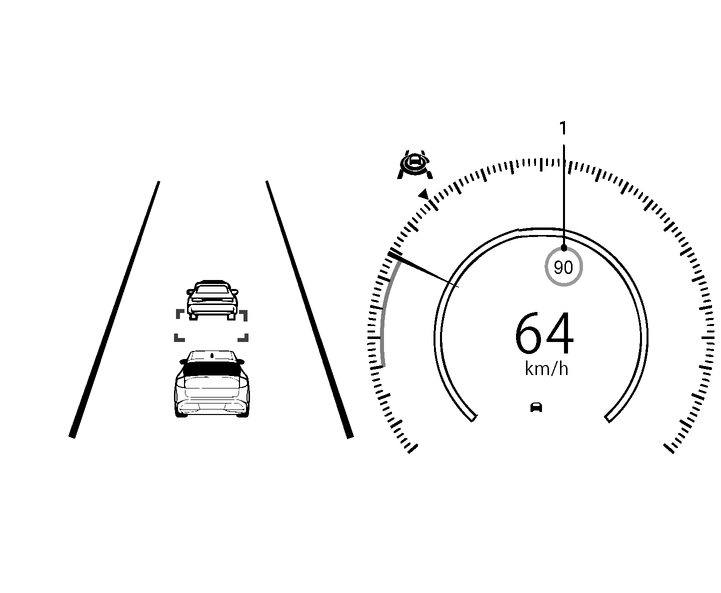
Detected speed limit indicator
Displays the currently detected speed limit. For additional information, see
.Applied speed limit indicator (green frame) indicates the detected speed limit can be applied to the IDC system.
How to activate or deactivate the system:
Push the

 button on the steering wheel until [Settings] appears in the vehicle information display, and push the scroll dial.
Use the scroll dial to select [Driver Assistance]. Then push the scroll dial.
Select [Forward Assist] and push the scroll dial.
Select [Speed Limit Link] and push the scroll dial to turn the system on or off.

The function will retain current settings in the vehicle information display even if the EV system is restarted.