
Nissan Leaf Owners Manual | 2025
8.5.4. How to switch the display
With the power switch placed in the ON position, push the <CAMERA/ > button or shift the transmission to the R (Reverse) position to operate the Intelligent Around View Monitor.
The Intelligent Around View Monitor displays different split screen views depending on the position of the transmission. Push the <CAMERA/> button to switch between the available views.
If the transmission is in the R (Reverse) position, the available views are:
Rear view/bird’s-eye view split screen
Rear view/front-side view split screen
Rear-wide view
3D view is not available in the R (Reverse) position.
If the transmission is out of the R (Reverse) position, the available views are:
Front view/bird’s-eye view split screen
Front view/front-side view split screen
Front-wide view
Invisible Hood View
3D view (touch the screen icon)
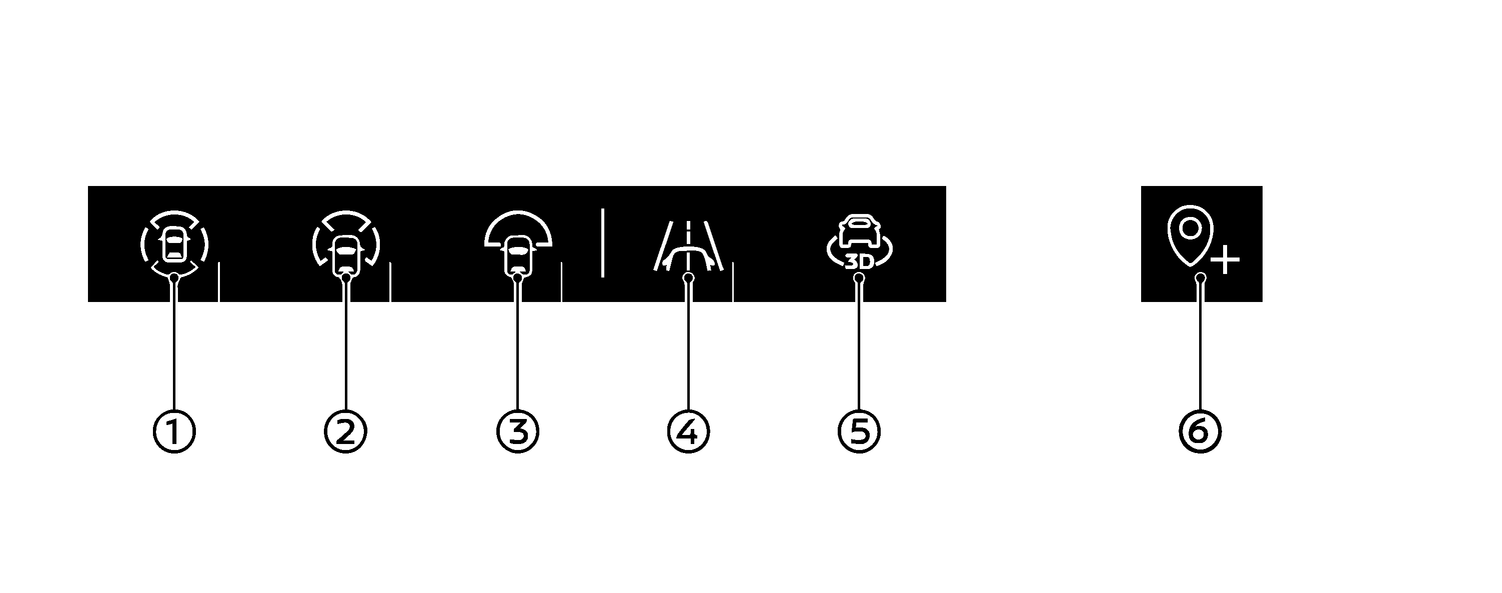
(1) Bird's-eye view (with front or rear view)
(2) Front side view* (with front or rear view)
(3) Wide view*
(4) Invisible Hood View
(5) 3D view (3D view is not available in the R (Reverse) position)
(6) Saved Locations (for front-wide view pop-up)
The display will switch from the Intelligent Around View Monitor screen when:
The transmission is in the D (Drive) position and the vehicle speed increases above approximately 20 km/h (12 MPH).
A different screen is selected.
3 minutes have passed without doing any operation.