
Nissan Leaf Owners Manual | 2025
9.17.5. How to enable/disable the Steering Assist
Use the following methods to enable or disable the Steering Assist.
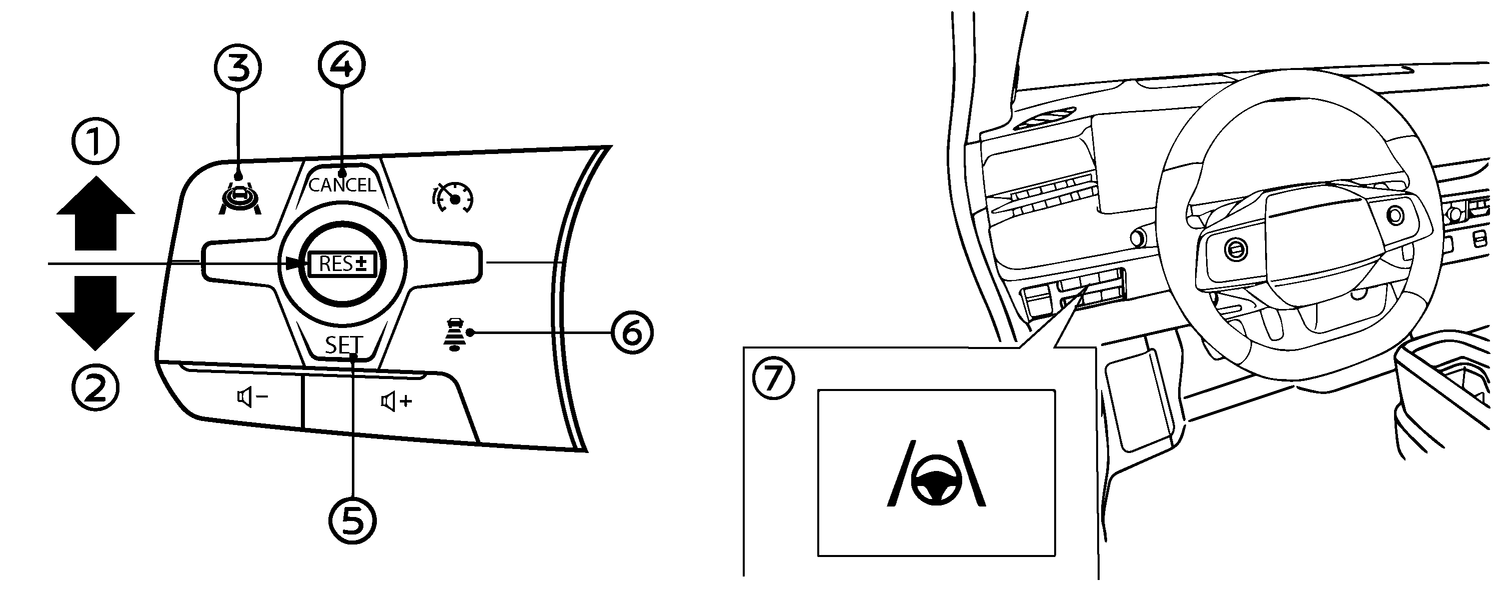
Steering Assist switch:
To turn the Steering Assist on, push the Steering Assist switch (7) in the instrument panel. The [Steering Assist ON] message will appear in the vehicle information display. To turn the Steering Assist off, push the Steering Assist switch (7) and the message [Steering Assist OFF] will appear in the vehicle information display.
Vehicle Information Display:
Perform the following steps to turn the Steering Assist on or off.
Push the

 button until [Settings] appears in the vehicle information display and then push the scroll dial.
 Use the scroll dial to select [Driver Assistance]. Then push the scroll dial.
Select [Lane Centering Assist] and push the scroll dial.
Push the scroll dial to turn the [Steering Assist] on or off.

When the Steering Assist switch is used to turn the system on or off, the system remembers the setting even if the power switch is cycled. The switch must be pushed again to change the setting to on or off.
The Steering Assist switch changes the status of the [Steering Assist] selection made in the [Settings] screen in the vehicle information display.
When the ProPILOT Assist screen is displayed on the vehicle information display, push the scroll dial on the steering wheel to call up the [Driver Assistance] setting display.
When enabling/disabling the system through the vehicle information display, the system retains the current settings even if the EV system is restarted.