
Nissan Leaf Owners Manual | 2025
8.5.1.3. Invisible Hood View
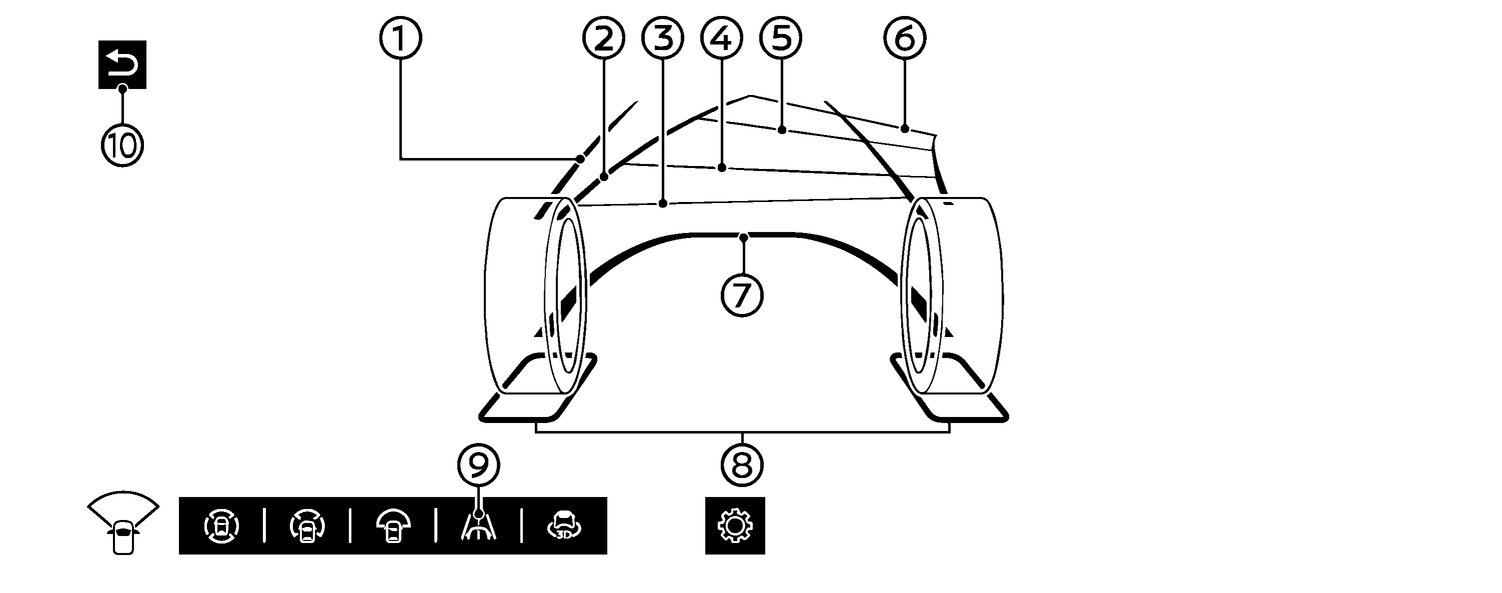
The Invisible Hood View allows user to see the road surface underneath the virtually transparent vehicle body. This may be useful for aligning the front wheels with the rails of the automatic car wash, or help to avoid hitting the side of the vehicle against curbs when operating at low speeds, for example.

The image of the road surface under the body is a composite from the front camera images, and does not actually show the road surface under the vehicle body.
Vehicle width guide lines (1):
Indicate the approximate vehicle width.
Predictive course lines (2):
Indicate the predictive course when reversing the vehicle. The predictive course lines will be displayed on the monitor when the vehicle is in R (Reverse) position and if the steering wheel is turned. The predictive course lines will move depending on how much the steering wheel is turned and will not be displayed while the steering wheel is in the straight ahead position.
Distance guide lines:
Indicate distances from the vehicle body.
Red line (3): approximately 0.5 m (1.5 ft)
Blue line (4): approximately 1 m (3 ft)
Blue line (5): approximately 2 m (7 ft)
Blue line (6): approximately 3 m (10 ft)
The Invisible Hood View will not be displayed when the vehicle speed is above 12 MPH (20 km/h).
Vehicle outline (7) :
Indicates the vehicle outline of the front area.
Wheel area lines (8):
Indicate the wheel outlines of the front wheels.
How to ON/OFF the Invisible Hood View
When the camera screen is displayed, touch (9) icon to activate the Invisible Hood View. To deactivate the Invisible Hood View, select other camera view or touch the return key (10).