
Nissan Leaf Owners Manual | 2025
9.18.1. IDC system display and indicators
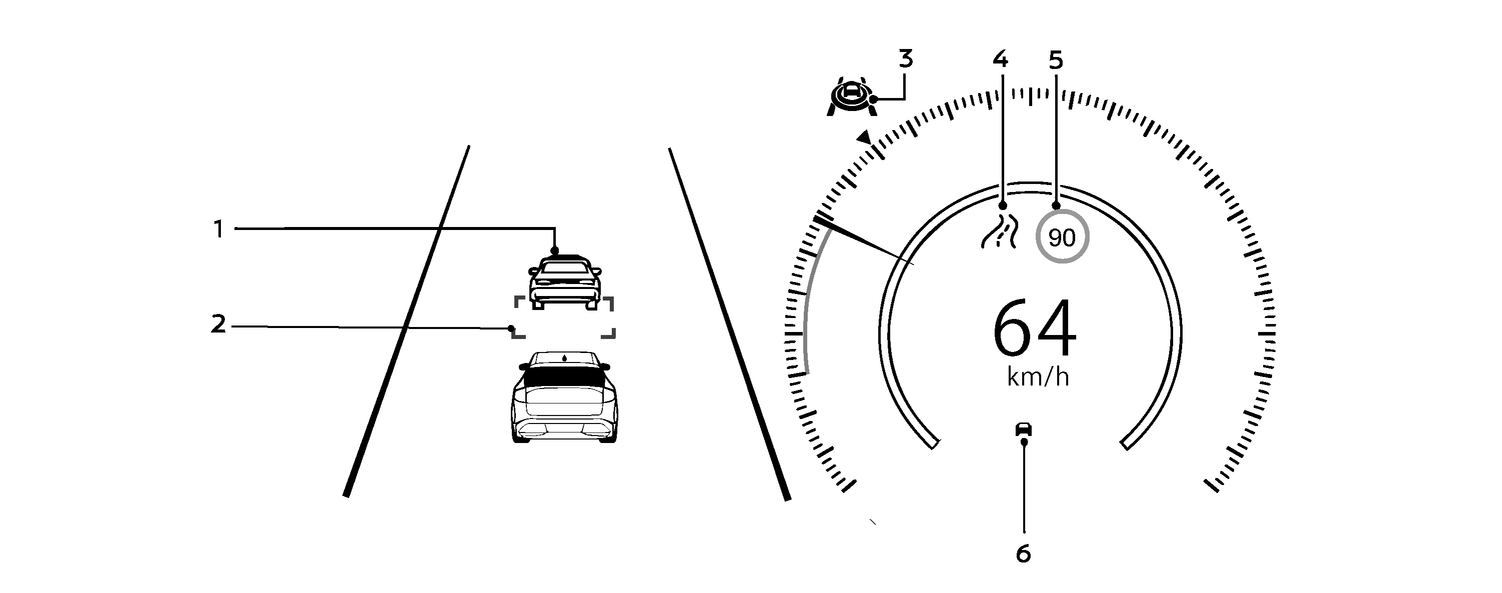
Vehicle ahead detection indicator
Displays whether the system detects a vehicle in front of you (only when the IDC is active)
Distance control vehicle marker
The distance control target vehicle is indicated with the green marker displayed below the vehicle.
ProPILOT Assist status indicator (
 )
)Indicates the status of the system by the colour of the indicator:
Status indicator (white): IDC is on
Status indicator (blue): ProPILOT Assist is active and IDC is off
Road information indicator (where fitted) (
 ,
, ,
, ,
, ,
, )
)Indicates the detected road information
Detected road sign (speed limit) indicator (where fitted) (
 )
)Indicates the currently detected speed limit
Intelligent Distance Control (IDC) status indicator (
 )
)Displays the status of the IDC system by the colour of the indicator.
Indicator (white): IDC is in standby
White vehicle icon displayed: Vehicle detected ahead
No vehicle icon displayed: No vehicle detected ahead
Indicator (green): IDC is active
Indicator (yellow): Indicates an IDC malfunction