
Nissan Leaf Owners Manual | 2025
9.18.3.4. Navi Link - a feature of Intelligent Distance Control with Navi-link (where fitted)
Listed below are the system limitations for the Navi Link. Failure to operate the vehicle in accordance with these system limitations could result in serious injury or death:
There are limitations to the Navi Link system capability. The system does not function in all driving, traffic, weather and road conditions. It is the driver’s responsibility to stay alert, drive safely, and be in control of the vehicle at all times.
The Navi Link system does not brake the vehicle to a stop. Whenever necessary, the driver must apply appropriate braking.
It is the driver’s responsibility to select the proper speed, follow all traffic regulations and observe other road users.
The Navi Link may not operate properly in some road and traffic conditions, and the system may unexpectedly change the speed. The driver must manually control the vehicle speed.
Below are some examples:
When driving in countries or areas not covered by the Map locator system.
When the data from the Map locator system is not up-to-date or is unavailable.
When the Map locator system is recalculating the route.
When driving on a road under construction or on a newly constructed road.
When driving near a road split or junction.
When driving in bad weather or poor road conditions.
When the camera cannot correctly detect the lanes.
When the Map locator system cannot connect to the server to get map information.
When the software licence for the Map locator system has expired.
When the Map locator system is recalculating the route.
When the IDC system is active and the driver release the accelerator peadal, the Navi Link uses road information provided by the Map locator system to assist the driver in reducing the vehicle speed depending on the following situations:
Curves
Motorway exits
Roundabouts
T-junctions
Also, the Navi Link assists the driver in reducing the vehicle speed when the turn signal indicator is turned on and the following situation is detected:
Turning at junctions
The system may not always reduce speed for all curves, exits, roundabouts, X/T-junctions, or side-turns and the driver may need to apply additional braking at any time.

The system does not operate when the accelerator pedal is depressed.
System display and indicators
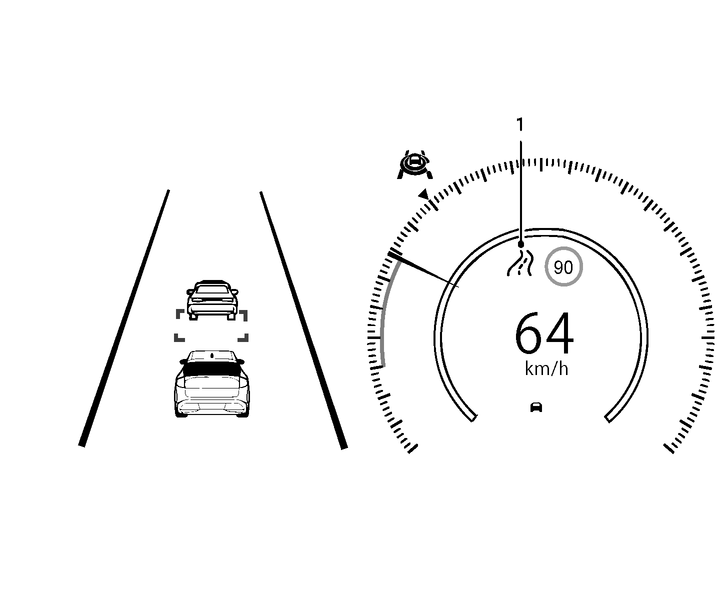
Road information indicator
Appears when the system adjusts the speed depending on turns or exits.
 | Curves | |
 | Right exits | |
 | Left exits | |
 | Roundabouts | |
 | T-junctions | |
 | X-junctions and side-turns | |
How to activate or deactivate the system
Push the

 button on the steering wheel until [Settings] appears in the vehicle information display, and push the scroll dial.
Use the scroll dial to select [Driver Assistance]. Then push the scroll dial.
Select [Forward Assist] and push the scroll dial.
Select [Navi Link] and push the scroll dial to turn the system on or off.
The system will retain current settings in the vehicle information display even if the EV system is restarted.