
Nissan Leaf Owners Manual | 2025
8.8.1.2. Manual operation
Fan speed control
Use the fan speed control buttons or keys to manually control the fan speed.
Air intake control
The air intake control mode will change each time the air intake control button or key is pushed or touched.
When the air recirculates inside the vehicle, the colour of the air intake control button and key are orange.
When the air flow is drawn from outside the vehicle, the colour of the air intake control button and key are white.
When the "
 " icon is displayed in the climate control screen, the air intake will be controlled automatically.
When the power switch is placed in the ON position, the air conditioning system may change to air recirculation mode automatically to increase cooling efficiency.
Air flow control
Touching the air flow control key manually controls air flow and selects the air outlet:
| Air flows mainly from the defroster |
| Air flows mainly from centre and side vents. |
| Air flows mainly from the foot outlet and partly from the defroster. |
 -
- -
- -
-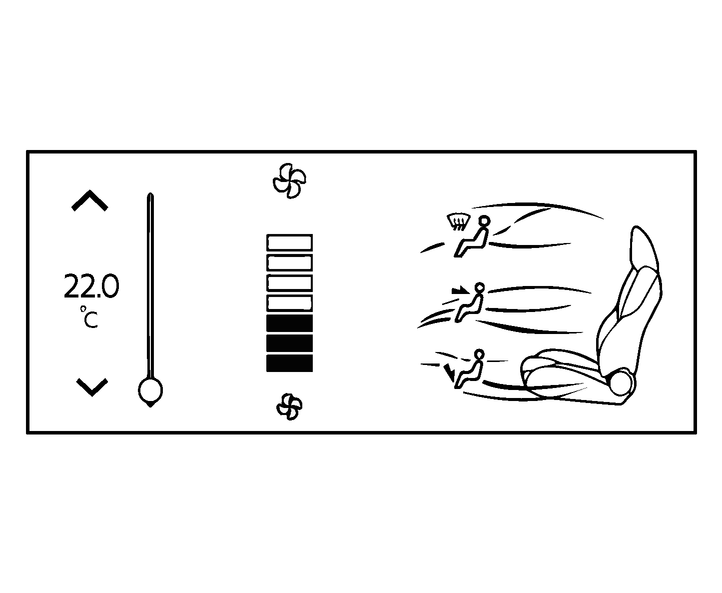
On the climate control screen, the status of air flow for each position can be checked.
You can turn on and off air flow individually by touching the desired position.
The intensity of the fans can be chosen by tapping on the fan control section of the display.
When adjusting the temperature, the colour on the airflow display will change depending on the temperature set.
Ventilation (A/C OFF)
While using the Air conditioner system, press the A/C button to turn off the Air conditioner system. This will be shown by the button turning white.

The ventilation mode requires a lower power consumption, so driving range will increase.