
Nissan Leaf Owners Manual | 2025
3.2.3.2. Li-ion battery heater
When the Li-ion battery temperature becomes lower, it can cause longer charging time by the DC fast charger.
The Li-ion battery heater will automatically turn on when the Li-ion battery temperature is cold during the DC fast charging. It will also turn on while driving if the function is enabled on the touch screen display. It will raise the Li-ion battery temperature to avoid extending charging time when using the DC fast charger.
When the Li-ion battery heater operates while fast charging, it uses electrical power from the DC fast charger.
The improvement of charging capacity varies depending on the temperature and/or remaining capacity of the Li-ion battery.
Manual Battery Heater (where fitted)
To allow the Li-ion battery heater to operate while driving, enable the function on the touch screen display. See
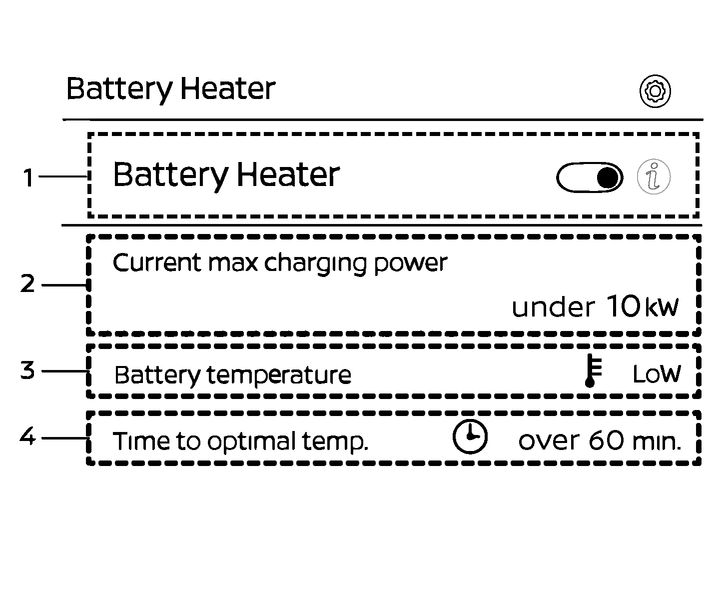
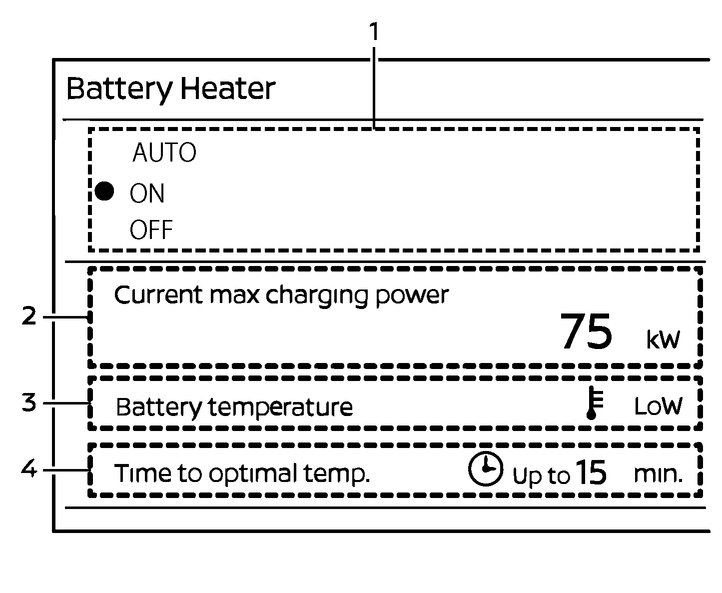
Battery Heater (where fitted)
Allows the driver to switch the feature [ON]/[OFF] and [AUTO] (where fitted).
Current max charging power
Indicates the approximate maximum charging power.
“— kW” will be displayed when charging is not possible. (Charging is not possible when the state of charge is 100%.)
Battery temperature
Indicated the current the Li-ion battery temperature.
Low
Battery temperature is low. It is recommended to turn on the battery heater before using DC fast charging.
Optimal
Battery has reached optimal temperature for charging.
(not displayed)
Battery temperature is already high enough for charging.
Time to optimal temp.
Indicates the approximate time it will take to reach the optimal battery temperature when the battery heater is activated. The time shown may vary depending on outside temperature, driving conditions, etc.
If the battery temperature is optimal or high enough already, this will not be displayed.
For type A (where fitted): Options 2, 3 and 4 are not displayed during charging.
For type B (where fitted): Options 2 and 4 will not be displayed during the charging. Also, when [AUTO] is selected, items 3 and 4 are not displayed.

When the Li-ion battery heater operates while driving, more electric power will be consumed than in normal driving condition, which could result in a decreased energy economy and driving range. Consider the state of charge of the Li-ion battery and the estimated driving range while driving.
When use of the battery heater is recommended, the battery temperature on the Battery heater switch screen indicates "LOW".
The current maximum charging power is also shown on the screen. If the current maximum charging power is lower than the charging power of the DC fast charger at your destination, it is recommended to turn the battery heater on.
The time it takes for the battery heater to reach the optimal temperature for charging is also displayed on the screen. Refer to the displayed time, you can turn on the battery heater before arriving at a DC fast charging station.
The time it takes for the battery to reach the optimal temperature for charging is an estimate only, and may vary depending on the outside temperature and driving conditions.
Once the DC fast charging is complete, or the power switch is set to OFF, the [Battery Heater] setting will switch to [OFF] (Type A), or to [AUTO] or [OFF] (Type B).
Battery Heater AUTO (where fitted):
When Battery Heater AUTO is selected, the system uses DC fast charger information (output and travel time to the charging station) from the navigation system to warm the Li-ion battery to the optimum temperature and at the right time for DC fast charging, thereby reducing charging time.
When the function is activated, the Battery Temperature Management Indicator will appear on the EV screen and the “Electric Vehicle” widget.
This function can be activated only during route guidance with the navigation system. To enable the function, select [AUTO] on the battery heater in the navigation system setup screen.
When the Li-ion battery heater operates while driving, more electric power will be consumed than in the normal driving condition, which could result in a decreased energy economy and driving range. Take account of the state of charge of the Li-ion battery and estimated driving range.
If the travel time to the DC fast charger station is short, the battery temperature may not rise sufficiently and charging performance may not improve.
This function may continue if you cancel the route guidance immediately after setting a route including the DC fast charger in the navigation system, but this function will be deactivated after a certain amount of driving.
If you cancel the route guidance before arriving at a DC fast charging station, this function will be deactivated. In addition, if route guidance is canceled near a DC fast charging station, the system will continue to guide you until you start fast charging or drive a certain distance away from the charging station. If you do not need the battery heating, turn it off with the battery heater screen.
If a transit point (other than the DC fast charge point) is added before arriving at a DC fast charge point, this function will not be activated until the vehicle has passed the transit point.
Even during the navigation system route guidance, the heater may not be activated in the following cases.
Li-ion battery state of charge is low.
If the DC fast charger output is low or predicted state of charge value at the arrival to a fast charge point is high.
Li-ion battery heater icon (where fitted)
When the Li-ion battery heater is activated, the Battery Temperature Management Indicator will appear on the EV screen and the “Electric Vehicle” widget.
 : Battery temperature is being optimised for your route.
 : Automatically preheating the battery to optimise fast charging for your route.
 : Battery heater active (turned ON by the user or automatically during charging when the battery is cold).
Battery Temperature Management (where fitted)
When driving to the destination with the guidance of the navigation system, the driving load is predicted from the route information, and the Li-ion battery temperature is controlled, contributing to the improvement of the energy economy and the DC fast charging speed.
This function is automatically enabled during route guidance by the navigation system. When the function is activated, the Battery Temperature Management Indicator
appears on the EV screen and the “Electric Vehicle” widget.Even during the navigation system route guidance, this function may not be enabled in the following cases:
When you deviate from the route guided by the navigation system.
When the GPS reception is poor.
When a DC fast charger is set as a transit point, the function may not be available during the period between the end of route guidance upon arrival at the charging station and the moment you press the [Continue] button on the navigation screen..