
Nissan Leaf Owners Manual | 2025
9.17.9.3. Operating conventional (fixed speed) cruise control mode
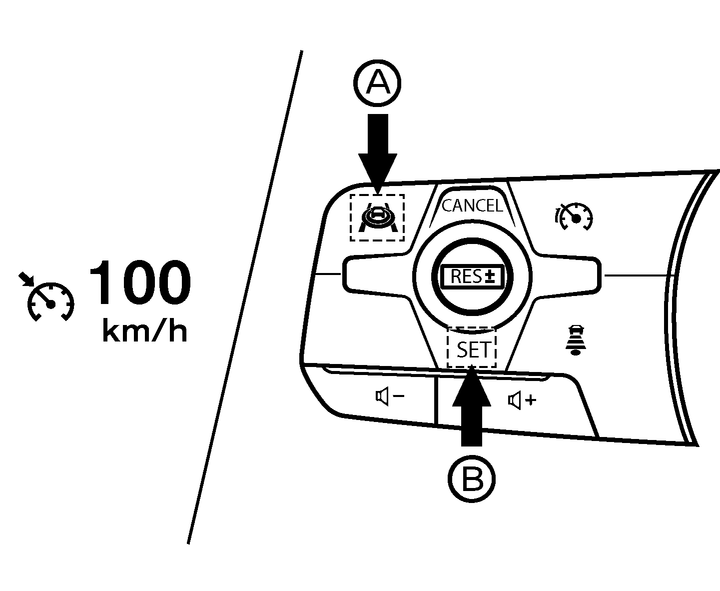
To turn on the conventional (fixed speed) cruise control mode, push the ProPILOT Assist switch (A) when [Standard Cruise Control] is selected in the [Cruise Mode] menu under the [Driver Assistance] main menu.
When the cruise control turns on, the cruise indicator appears.
You can now set your desired cruising speed.
Pushing the ProPILOT Assist switch (A) again will turn the system completely off.

If the EV system is turned off while the conventional cruise control is on, the conventional cruise control will be in standby once the EV system is turned on again.
To use the ProPILOT Assist system again, change settings in the [Driver Assistance] main menu by selecting [Cruise Mode] and choosing [ProPILOT Assist]. The system can be cancelled by changing the mode while the system is active.
To avoid accidentally engaging cruise control, make sure to turn the ProPILOT Assist switch off when not using the cruise control system.
To set cruising speed, accelerate your vehicle to the desired speed, push the <SET> switch (B). (The colour of the cruise indicator changes to green and vehicle set speed indicator comes on.) Take your foot off the accelerator pedal. Your vehicle will maintain the set speed.
To pass another vehicle, depress the accelerator pedal. When you release the pedal, the vehicle will return to the previously set speed.
The vehicle may not maintain the set speed when going up or down steep hills. If this happens, manually maintain vehicle speed.
To cancel the preset vehicle speed, use any of the following methods:
Push the <CANCEL> switch (4). The vehicle set speed indicator and the cruise indicator will turn grey.
Tap the brake pedal. The vehicle set speed indicator and the cruise indicator will turn grey.
Turn the ProPILOT Assist switch (A) off. Both the cruise indicator and vehicle set speed indicator will turn off.
To reset at a faster cruising speed, use one of the following methods:
Push up and hold the <RES±> switch (1) to increase speed in 10 km/h (5 MPH) increments.
Push up and quickly release the <RES±> switch (1) to to increase speed by 1 km/h (1 MPH).
Accelerate to new desired speed and push the <SET> switch (5).
To reset at a slower cruising speed, use one of the following methods:
Push down and hold the <RES±> switch (2) to decrease speed in 10 km/h (5 MPH) increments.
Push down and quickly release the <RES±> switch (2) to to decrease speed by 1 km/h (1 MPH).