
Nissan Leaf Owners Manual | 2025
6.12.1.5. Adaptive driving beam (where fitted)
A camera-controlled system which automatically maximises night time forward visibility, while preventing bright light from shining directly at oncoming traffic and blinding drivers of oncoming vehicles.
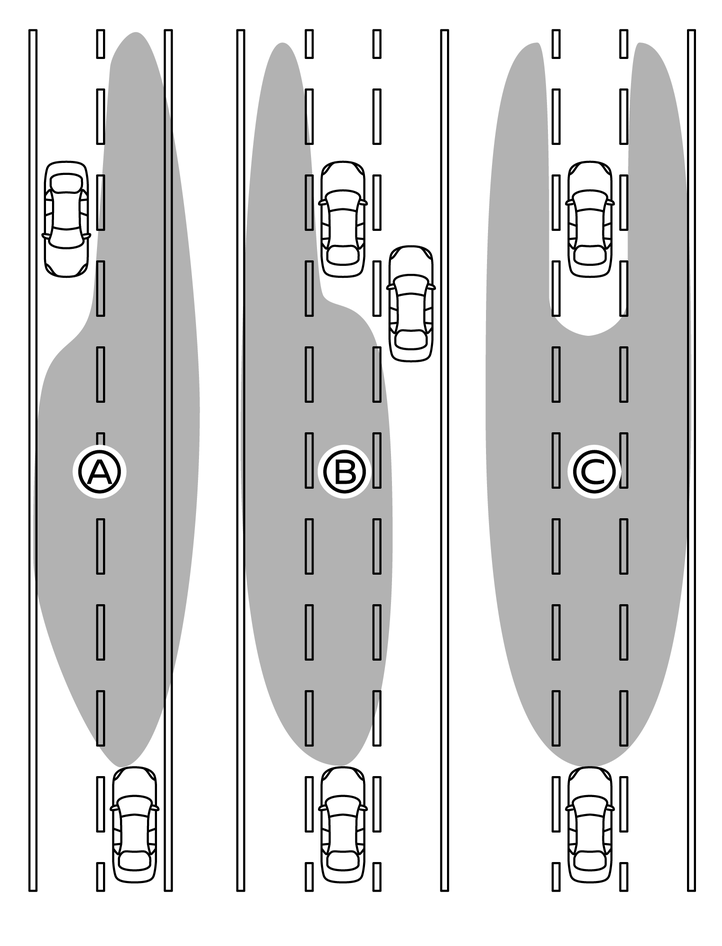
Example:
- (A)Right side beam only (for an oncoming vehicle)
- (B)Left side beam only (for leading vehicles)
- (C)Split beam (for a leading vehicle)
The Adaptive Driving Beam cannot compensate for road and weather circumstances while driving. The driver always remains responsible for choosing the correct light setting.
In heavy rain, snowy conditions. (general poor visibility and bad weather conditions).
When the vehicle sensors are dirty, covered or broken.
When oncoming or preceding vehicle lights are obscured, for example by a solid barrier.
Adaptive Driving Beam activation:
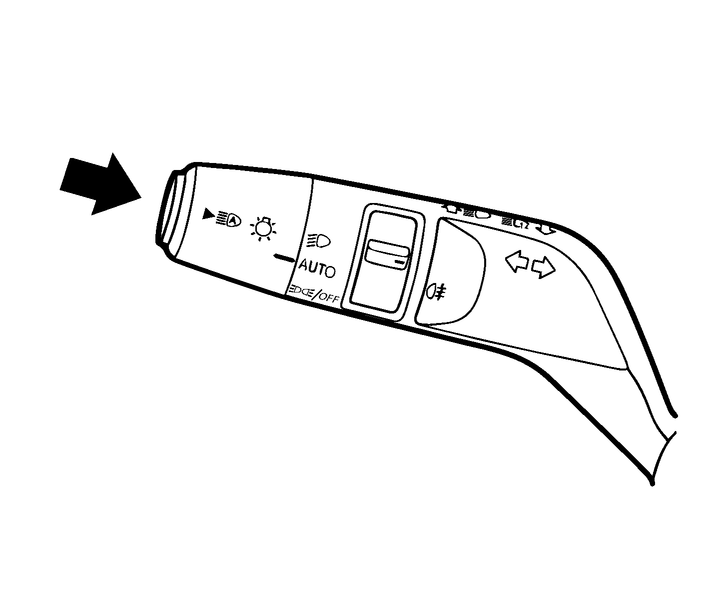
To switch on the Adaptive Driving Beam system, push the switch as illustrated when it is in the <AUTO> position. The Adaptive Driving Beam indicator light  in the instrument panel will illuminate.
The system will now detect oncoming traffic and automatically adjust the beam of the headlights to avoid blinding drivers of oncoming vehicles. At the same time it will provide maximum illumination of the road ahead.
Adaptive Driving Beam comes on automatically in dark conditions if the vehicle speed is over 40 km/h (25 MPH).
Adaptive Driving Beam turns off automatically if the vehicle speed drops below 25 km/h (15 MPH).
The  light indicates that the Adaptive Driving Beam system is active.

If the Adaptive Driving Beam is not active (for example: up to 15 seconds after start up, camera view blocked, speed below activation threshold, or in an area well lit by street lighting) the headlights will operate in low beam until the system can activate. The indicator light remains illuminated to show that the system is switched on, but the light remains off until the activation criteria are met.
To turn the Adaptive Driving Beam off push the switch again, or turn the headlight switch to the  or
or  position.